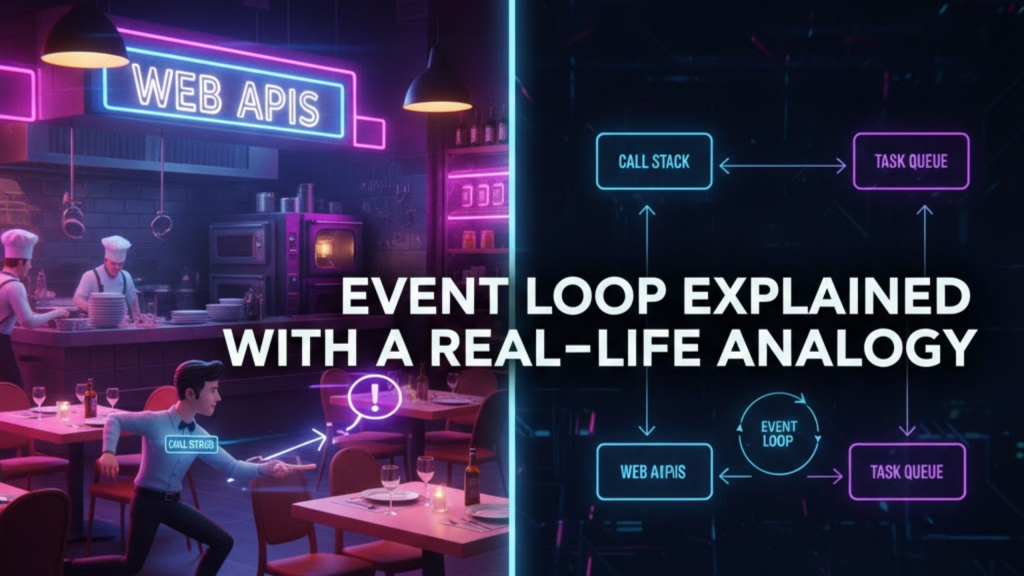
If you have ever wondered how JavaScript handles thousands of tasks while only having one “brain,” you are looking for the Event Loop Explained with a Real-Life Analogy. Most technical documents use confusing terms like “Stack Frames” and “Heap Allocation.” However, the core of this system is actually very similar to how a busy restaurant operates.
At WeBlogTrips, we focus on intuitive learning. Therefore, we created this guide to provide the Event Loop Explained with a Real-Life Analogy so you can finally understand how non-blocking code works in 2026.
The Restaurant Analogy: Event Loop Explained with a Real-Life Analogy
Imagine a high-end sushi bar. To understand the Event Loop Explained with a Real-Life Analogy, we need to identify the key players:
| Role in Restaurant | Role in JavaScript | What They Do |
| The Waiter | The Call Stack | Takes orders and executes immediate tasks |
| The Kitchen | Web APIs (Browser) | Handles long-running tasks like cooking (APIs) |
| The Pickup Counter | The Task Queue | Where finished food waits to be served |
| The Manager | The Event Loop | Checks if the waiter is free to serve the food |
1. The Call Stack: The Busy Waiter
In our Event Loop Explained with a Real-Life Analogy, the Waiter (Call Stack) is the only one who can talk to the customers. The waiter is single-threaded; they can only take one order at a time. If you ask for a glass of water, they do it immediately.
However, if every customer ordered a 30-minute steak and the waiter stood in the kitchen waiting for it to cook, the whole restaurant would freeze. This is Event Loop Explained with a Real-Life Analogy at its most basic: the waiter must never “block” the customers.
2. Web APIs: The Professional Kitchen
When a customer orders a complex meal, the waiter writes it down and hands the ticket to the Kitchen (Web APIs). The Kitchen has many chefs and can cook many meals at once. This represents Event Loop Explained with a Real-Life Analogy for asynchronous tasks like fetching data or setting timers.
While the kitchen is cooking, the Waiter (Call Stack) is free to go back to the tables and take more orders or serve drinks. This is why your website doesn’t freeze when you click a button while data is loading in the background.
3. The Manager: The Event Loop Logic
The “Manager” is the secret to the Event Loop Explained with a Real-Life Analogy. The Manager constantly checks two things:
- Is the Waiter (Call Stack) currently busy with a customer?
- Is there finished food waiting at the Pickup Counter (Task Queue)?
If the Waiter is empty-handed, the Manager takes the first meal from the counter and gives it to the Waiter to serve. This cycle ensures that JavaScript always prioritizes immediate work before handling finished background tasks.
Frequently Asked Questions (FAQ)
1. Why does my timer sometimes take longer than I set?
In the Event Loop Explained with a Real-Life Analogy, a setTimeout of 5 seconds doesn’t mean the food is served in 5 seconds. It means the kitchen finishes cooking in 5 seconds. If the waiter is busy with a massive party, the food sits on the counter until the waiter is free.
2. Can I have more than one waiter?
Not in standard JavaScript. However, you can use Web Workers, which are like hiring a second waiter for a separate room. They can’t help with the main tables (the DOM), but they can do heavy work elsewhere.
3. Will a slow Event Loop cause an Apple Security Warning?
Not directly. However, if your Event Loop is so blocked that your security scripts can’t run, you might trigger an Apple Security Warning on your iPhone. Always keep your “waiter” fast and responsive to maintain a secure environment.
Final Verdict: Event Loop Explained with a Real-Life Analogy
To master the Event Loop Explained with a Real-Life Analogy:
- The Call Stack handles the “now.”
- Web APIs handle the “later.”
- The Event Loop is the bridge that connects the two without crashing the site.
By writing code that respects this restaurant-style flow, you ensure your applications remain buttery smooth and professional.
More From Weblogtrips
- Why JavaScript Is Single-Threaded: The “One Waiter” rule explained.
- Promise vs async/await: What Actually Happens?: How orders move through the kitchen.
- JavaScript Closures Explained Like You’re 5: How memory is preserved during async suspension.
- Why Your Website Is Slow and How to Fix It: CDNs are the #1 fix for global slowness.
- let vs var vs const Explained with Real Examples: Why block scope is the best partner for closures.
- REST API vs GraphQL Explained for Beginners: APIs are where most CORS errors live.
- Best Website Hosting 2026: Find hosts with integrated CDN features.
- HTML vs HTML5: What’s the Real Difference?: The foundation that holds your CSS.
- What Happens When You Type a URL in a Browser: Where JavaScript begins its execution.
- Frontend vs Backend vs Full Stack 2026 Guide: Why React mastery is essential for frontend roles.
External Links
- JavaScript.info: Event Loop: A deep technical dive into microtasks.
- MDN: Concurrency model and the event loop: The official technical spec.
- Loupe: Event Loop Visualizer: A tool that lets you see your code move through the restaurant in real-time.