
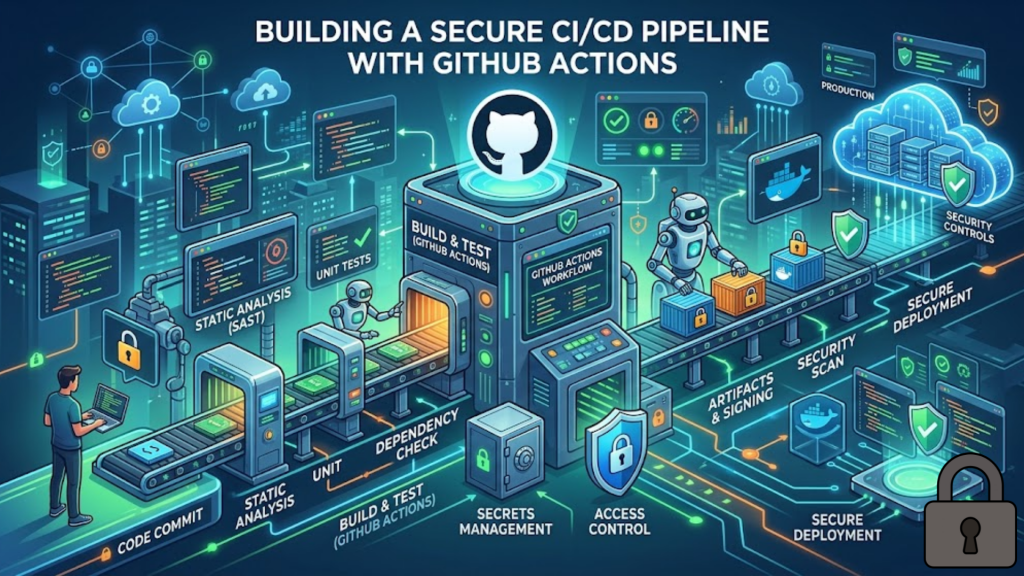
What is a Secure CI/CD Pipeline?
A secure CI/CD pipeline is an automated workflow where every step is verified, every secret is protected, and every external dependency is audited. In 2026, we no longer rely on “security by obscurity.” Instead, we use Zero-Trust CI/CD, where the pipeline itself is treated as a high-risk environment. By implementing OIDC (OpenID Connect) and Least-Privilege GITHUB_TOKENs, you ensure that even if a workflow is compromised, the “blast radius” is confined to a single, temporary job.
In 2026, your pipeline is the most valuable target in your stack. Hardening it is not an option; it is a necessity for survival.
3 Pillars of GitHub Actions Security in 2026
To protect your 2026 projects, you must move beyond basic repository secrets. Follow these three “Hardening Pillars”.
1. Ditch Static Keys for OIDC
Stop storing long-lived AWS or Azure keys in your repository settings.
- The 2026 Way: Use OpenID Connect (OIDC). GitHub Actions now acts as an identity provider. When a job runs, GitHub issues a short-lived JSON Web Token (JWT). Your cloud provider (AWS/GCP/Azure) validates this token and issues temporary, 1-hour credentials. There are zero stored secrets to steal.
2. Set Least-Privilege GITHUB_TOKEN
By default, GitHub gives your workflow more power than it needs.
- The Strategy: Explicitly restrict the
GITHUB_TOKENat the top of your YAML file. Set it tocontents: readas the global default. Only grantwriteaccess to the specific jobs that need to push code or create releases.
3. Use “Harden-Runner” for Egress Control
In 2026, the biggest threat is “Exfiltration”, where a malicious dependency steals your code and sends it to an external server.
- The Strategy: Use a tool like StepSecurity Harden-Runner. It monitors and blocks all network traffic from your runner except to authorized domains (like
npmjs.comorgithub.com). If a script tries to send your data to an unknown IP, it is blocked instantly.
The 2026 Workflow Hardening Checklist
Before you push your next .github/workflows/main.yml, ensure it passes this security audit:
- Pin Actions to SHAs: Never use
@v4or@master. A tag can be moved by a hacker. Instead, pin actions to their full Commit SHA (e.g.,uses: actions/checkout@b4ff...). This ensures the code you run is exactly what you audited. - Enable Secret Scanning: Ensure “Push Protection” is enabled in your repository settings. This proactively blocks any commit that accidentally contains a visible API key or token.
- Environment Protection: Use GitHub Environments for production. Require a manual approval from a senior dev before the “Deploy” job can access your production OIDC roles.
Frequently Asked Questions (FAQ)
1. Is OIDC hard to set up?
No. While the initial trust policy in your cloud (AWS/Azure) takes about 10 minutes to configure, it saves hours of work later because you never have to rotate keys again.
2. Can I use self-hosted runners safely?
Only for private repositories. In 2026, using self-hosted runners on public repos is a major risk, as a simple Pull Request could allow an attacker to execute code on your internal network.
3. What is a “Supply Chain Attack” in CI/CD?
This happens when a legitimate tool or action you use is hijacked by a hacker. By pinning to Commit SHAs and using Harden-Runner, you protect yourself even if the tool’s author is compromised.
4. Why do I see an Apple Security Warning on my runner?
If your macOS runner attempts to execute unsigned binaries or modify system-level paths without the correct entitlements, you may trigger an Apple Security Warning on your iPhone or Mac.
5. What is the “Redaction” feature?
GitHub Actions automatically “masks” secrets in your logs, replacing them with ***. However, you should still avoid printing secrets in debug commands, as complex structured data (like JSON) can sometimes bypass this masking.
6. Should I use workflow_run or pull_request_target?
Be extremely careful. These triggers can give untrusted code access to your secrets. In 2026, best practice is to avoid these unless you have implemented strict CODEOWNERS and manual review requirements.
7. How often should I rotate secrets?
If you still use static secrets, rotate them every 30 to 90 days. However, if you use OIDC, rotation is handled automatically for every single job run.
8. What is “Artifact Signing”?
This is a 2026 standard (often using Sigstore) where your pipeline digitally signs the “Build” it produces. This proves to the production server that the code came from your authorized pipeline and wasn’t swapped mid-air.
Final Verdict: Automate with Authority
In 2026, GitHub Actions is the engine of your development, but it must be an armored engine. By implementing OIDC, pinning your dependencies, and restricting egress, you build a pipeline that is resilient to the threats of the modern web.
Ready to harden your pipeline? Explore our guide on Zero-Trust Architecture for Web Developers or learn about the Next.js 16 vs. Nuxt 4 Showdown to see how frameworks integrate with CI/CD.
Authority Resources
- GitHub Blog: Build a CI/CD Pipeline in Four Simple Steps – The foundation for automated workflows on GitHub.
- StepSecurity: 7 GitHub Actions Security Best Practices – A high-impact checklist for hardening runners and secrets.
- Parsectix: Why OIDC Integration Matters for AWS – A deep dive into replacing static keys with short-lived tokens.
- Salesforce Engineering: GitHub Actions Security Best Practices – Enterprise-grade standards for pinning, caching, and custom actions.





