If you’ve been writing React apps in 2026, you know useEffect has been the go-to for data fetching. But with React 19 use() Hook, a new era is dawning. This powerful new primitive fundamentally changes how we think about asynchronous operations, promising cleaner code and more intuitive data handling. Many developers are asking: is this the end of useEffect for good?
At WeBlogTrips, we track the leading edge of web development. Consequently, we created this guide to explore the React 19 use() Hook and answer the critical question: is this the end of useEffect?
Quick Look: React 19 use() Hook vs useEffect
| Feature | useEffect (Legacy for Data) | React 19 use() Hook (Modern) |
| Syntax | Callback, dependency array | Direct call within render |
| Error Handling | Requires manual try/catch | Integrated with Error Boundaries |
| Loading States | Manual isLoading state | Integrated with Suspense |
| Conditional Fetching | Complex logic in dependencies | Simple if statements |
| Readability | Can be verbose | Concise, synchronous-like code |
| Primary Use | Synchronization | Reading values from Promises |
1. React 19 use() Hook: The New Way to Read Promises
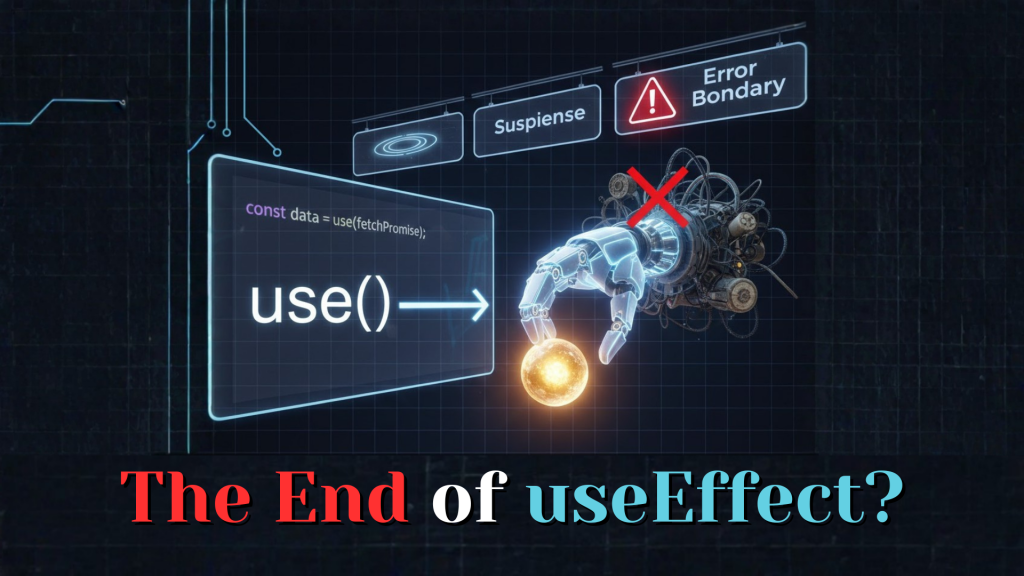
The core innovation of the React 19 use() Hook is its ability to directly read the value of a Promise. Instead of wrapping your data fetch in useEffect and manually managing isLoading, data, and error states, you simply use() the Promise.
When the Promise resolves, use() returns the data. If the Promise is still pending, it suspends the component (handing off to a parent <Suspense> boundary). If the Promise rejects, it throws an error (caught by a parent <ErrorBoundary>). This integration with Suspense and Error Boundaries is why the React 19 use() Hook feels like a complete revolution.
2. Why React 19 use() Hook Might Replace useEffect (for Data)
For most data fetching scenarios, the React 19 use() Hook offers a significantly better developer experience. It allows you to write asynchronous code that looks synchronous.
Consider these advantages:
- No More
isLoadingStates: Suspense handles it automatically. - Direct Error Handling: Errors are thrown and caught by Error Boundaries, not managed manually.
- Easier Conditional Fetching: You can put
use()inside anifstatement, which is impossible with Hooks likeuseEffect. - Reduced Boilerplate: Cleaner, more readable components.
Therefore, for getting data from an API, the React 19 use() Hook is a strong candidate to largely replace useEffect.
3. Is This The End of useEffect for Everything?
No. While the React 19 use() Hook will certainly take over many data fetching responsibilities, useEffect still has its place for synchronization. Remember, useEffect is for when you need to synchronize with an external system.
Keep using useEffect for things like:
- Connecting to WebSockets: Setting up and tearing down subscriptions.
- Integrating with Third-Party Libraries: Initializing a chart library or a video player.
- Manually Manipulating the DOM: Direct interactions outside of React’s control.
So, while its role for data fetching will diminish, useEffect remains a crucial tool in the React developer’s toolkit for other side effects.
Frequently Asked Questions (FAQ)
1. Do I need a special setup for the React 19 use() Hook?
You will need to be running a compatible version of React 19 (or a Canary/Experimental build) and have <Suspense> and <ErrorBoundary> components set up in your component tree to fully leverage its power.
2. How does use() handle caching?
The use() Hook itself doesn’t provide caching. It relies on the underlying Promise. However, it integrates seamlessly with caching libraries like TanStack Query (which often returns Promises), allowing you to leverage their advanced caching mechanisms.
3. Why does the React 19 use() Hook trigger an Apple Security Warning?
If the Promise consumed by use() attempts to fetch data from an insecure (HTTP) endpoint or handles sensitive data without proper encryption, it can still trigger an Apple Security Warning on your iPhone. Always ensure your data sources adhere to 2026 security best practices, regardless of how you fetch them.
Final Verdict: React 19 use() Hook
To summarize the impact of the React 19 use() Hook:
- It drastically simplifies data fetching by integrating directly with Suspense and Error Boundaries.
- It allows for cleaner, more synchronous-looking code when working with Promises.
useEffectwill still be vital for synchronizing with external systems and non-data side effects.
The React 19 use() Hook is a significant step towards a more intuitive and powerful way to build React applications, especially for handling asynchronous data.
More From Weblogtrips
- React Suspense and Error Boundaries: A Modern Guide: Essential partners for the
use()Hook. - React Query vs useEffect for Data Fetching: How modern data libraries integrate with Suspense.
- What Is Server-Side Rendering and Why It Matters: A deep dive into Next.js’s core strength.
- Why JavaScript Is Single-Threaded: How the main thread handles the Garbage Collector.
- React 18 useEffect: Why It Runs Twice: Why cleanup functions are the key to memory safety.
- Promise vs async/await: What Actually Happens?: How orders move through the kitchen.
- JavaScript Closures Explained Like You’re 5: How memory is preserved during async suspension.
- Why Your Website Is Slow and How to Fix It: How Next.js tackles performance bottlenecks.
- let vs var vs const Explained with Real Examples: Why block scope is the best partner for closures.
- REST API vs GraphQL Explained for Beginners: APIs are where most CORS errors live.
- Best Website Hosting 2026: Find hosts with integrated CDN features.
- HTML vs HTML5: What’s the Real Difference?: The foundation that holds your CSS.
External Links
- React.dev: The use() Hook (Experimental): The official (experimental) documentation.
- Vercel Blog: React Server Components and use(): How
use()powers server-side rendering. - Josh W. Comeau: The use() Hook: A fantastic visual explanation by a React expert.