
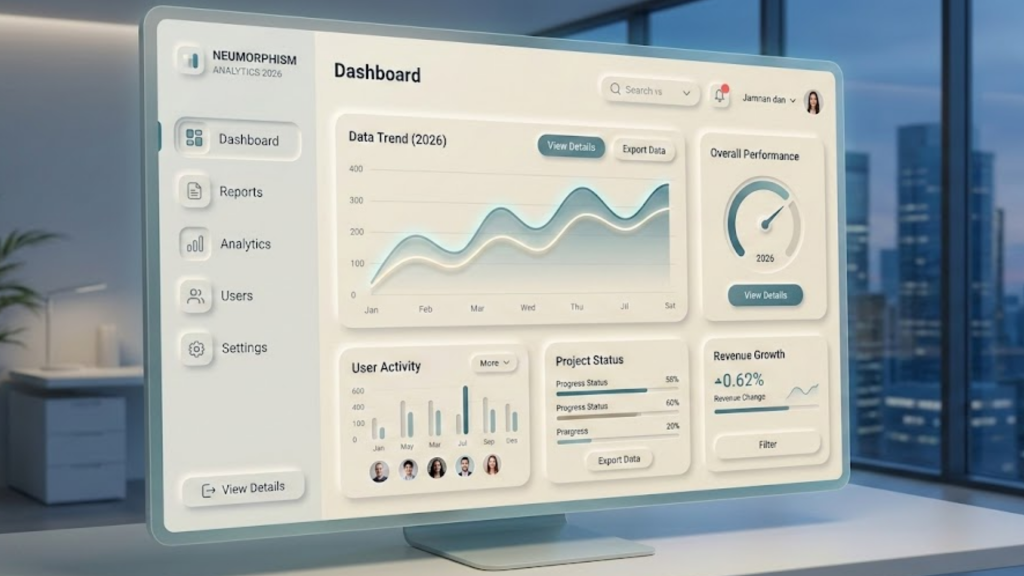
What is Neumorphism in 2026?
Neumorphism, or “Soft UI,” is a design style that uses highlights and shadows to make elements look like they are part of the background surface. In 2026, it has evolved into a highly functional aesthetic for control-heavy dashboards. Unlike the flat design of the 2010s, Neumorphism 2026 uses subtle gradients and “extruded” shapes to provide a sense of physical touch, making digital buttons feel like real-world switches.
This style is particularly popular in Smart Home and Health Tech interfaces because it reduces cognitive load by mimicking the physical world.
3 Rules for 2026 Neumorphic Shadows
To make Neumorphism work in 2026, you must master the “Double Shadow” technique. This is what creates the illusion of depth.
1. The Light Source Rule
Every element must have two shadows: a Light Shadow (top-left) and a Dark Shadow (bottom-right).
- Light Shadow: Use a color that is 10% to 15% lighter than your background.
- Dark Shadow: Use a color that is 10% to 15% darker than your background.
2. Monochromatic Backgrounds
Neumorphism only works if the background and the element are the exact same color. The only thing that defines the shape is the shadow. If you change the button color, the effect is broken.
3. The Concave Toggle
In 2026, we use Inset Shadows to show a button is pressed.
- Unpressed: Outer shadows make it look like it’s “popping out.”
- Pressed: Inner (inset) shadows make it look like it has been “pushed in” to the surface.
Solving the Accessibility Problem
The biggest challenge for Neumorphism has always been low contrast. In 2026, we solve this with Hybrid Neumorphism.
- High-Contrast Icons: While the button “body” is soft, the icons and text inside must have a high contrast ratio (at least 4.5:1) to meet WCAG standards.
- Active Borders: Use a 1px solid border on active elements to ensure users with visual impairments can still identify the interactive areas.
- State Indicators: Never rely solely on a shadow change to show a button is “on.” Add a small colored LED dot or a high-contrast label.
Frequently Asked Questions (FAQ)
1. Is Neumorphism better than Flat Design?
For dashboards that require “physical” interaction (like dimmers or sliders), yes. For text-heavy sites like blogs, no. Flat design is still superior for reading, while Neumorphism is king for control panels.
2. What background colors work best for Neumorphism?
Soft greys and off-whites are traditional. However, 2026 has seen a rise in Dark Mode Neumorphism, using deep charcoals and navy blues with subtle luminosity.
3. Can I use Neumorphism with Tailwind CSS?
Yes! You can easily extend Tailwind’s theme with custom shadow utilities to create “soft-ui” classes that you can apply to any div.
4. Why do I see an Apple Security Warning on my dashboard?
If your dashboard attempts to access local IoT devices or hardware sensors without a secure HTTPS connection, you may trigger an Apple Security Warning on your iPhone.
5. Does Neumorphism affect page speed?
Not significantly. Since it relies on CSS box-shadows rather than images, it is very lightweight. However, overusing multiple shadows on a single page can slightly increase the GPU load on older mobile devices.
6. What is the “Glassmorphism” overlap?
In 2026, many designers mix the two. They use Neumorphic shapes for the main structure and Glassmorphic panels for the overlays and popups.
7. Is Neumorphism good for e-commerce?
Usually not. E-commerce requires very clear “Buy” buttons. Neumorphism is often too subtle for high-conversion retail environments.
8. How do I make Neumorphism look “Premium”?
Avoid pure white and pure black. Use a background with a tiny hint of blue or purple (e.g., #E0E5EC) to give the interface a “tech” feel rather than a “plastic” one.
Final Verdict: Tactile Depth for Specific Niches
In 2026, Neumorphism is a specialized tool. It is the perfect choice for high-end control systems where the user needs to “feel” the interface. By balancing soft shadows with sharp accessibility, you can create a unique, modern experience that stands out from the flat web.
Ready to build a soft UI? Explore our guide on Glassmorphism 2.0: Modern CSS Techniques or learn how to optimize your dashboard in Why Remix is the Best Framework for Data-Heavy Dashboards.
Authority Resources
- The Inverness Design Studio: Neumorphism Trends 2026 – Analysis of tactile UI in the current market.
- Exclusive Addons: Neumorphism CSS Guide – Technical steps for building soft-ui shadows.
- Medium: Why Neumorphism is Back for 2026 – Understanding the psychological comfort of soft interfaces.
- UX Pilot: Neumorphism and Accessibility – How to pass contrast audits with a neumorphic theme.





